

I installed it from the Calamaries Installer found in the LIVE USB ISO this time. And Instead of my primary hdd, I installed it on the other one. Works now, thanks for all of your support, dear nerds.
This error (hd0) is typical of legacy (BIOS) booting end happens solely because of the MBR. GRUB2 is hit or miss with MBR.
If you’re not planning on dual booting with Windows XP/Vista/7, I’d recommend going to your motherboard settings and changing the boot mode to UEFI.
Then reinstall Debian. That will automatically sort things out :)
I thought the only reason to still use GRUB2 was its MBR support.
We really should be moving on at this point.
what’s next?
REFInd vor systemd-boot
Time to rehearse our new well-actually hymn: “What people commonly call Linux is actually GNU/Systemd/Linux…”
I dont know how you flashed the usb, but it seems like the installer is damaged. Try redownloading the iso, check the file hash, flash the usb drive with balena etcher and reinstall.
Did you change the partition layout in the installer?
Okay, I will try again with a live-boot USB this time
edit: Thanks so much! This finally worked
Try Fedora ^^
This works perfectly! Fedora actually installed like a normal distro on my primary disk. Since my primary is faster, I will remove debian from my secondary now.
You can have my upvote, lmao.
I’d say grub is having trouble with your hardware (mainboard or disk maybe).
You could try to update your mainboard’s firmware, or install another bootloader (or maybe just a newer version of grub). I’m not sure what the easiest way to get a different bootloader is. I don’t think Debian’s installer offers anything besides grub. Maybe other people can point to a distro where installing something other than grub is easy.
Because switching out the bootloader on an unbootable system (i.e. not from the installer) is going to be whole pain in the butt involving booting into a live usb, mounting and chrooting and god knows what.
It’s a configuration error in Grub.
This has guidance on how to fix Grub; the 3rd answer on the page is the most comprehensive on how to fix this: https://askubuntu.com/questions/397485/what-to-do-when-i-get-an-attempt-to-read-or-write-outside-of-disk-hd0-error?noredirect=1&lq=1
This is the screen a few seconds afterwards
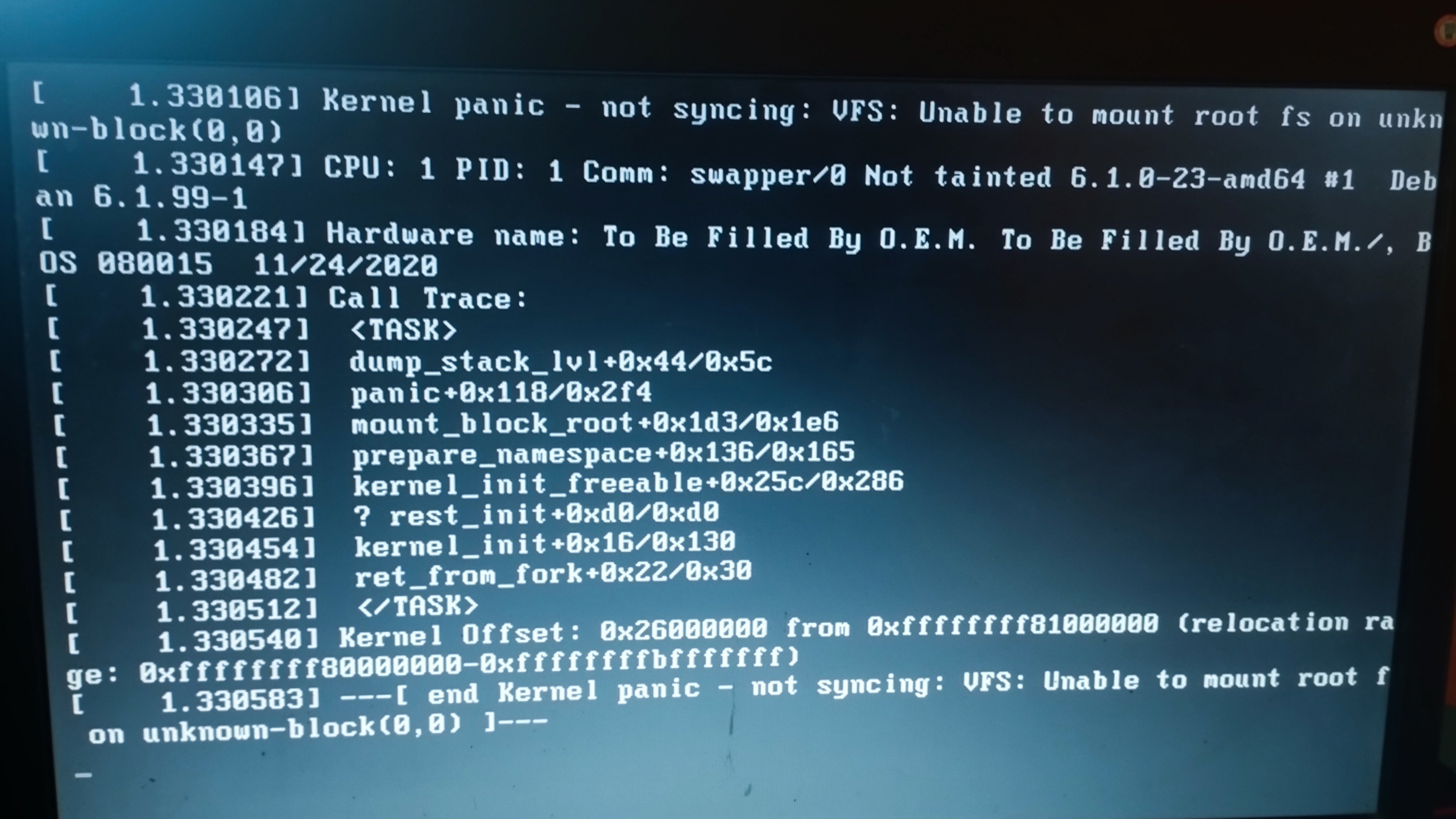
Considering that it has a 2020 firmware, and is built by “to be filled by OEM”, my completely unfounded wild guess is that the system firmware has broken legacy boot support. From other posts here, I gather you’re using a legacy dos-style partition table. Try installing again with GPT/EFI instead.



![[SOLVED] First time installing linux (Debian). Got this error. Please help](https://lemmy.world/pictrs/image/3f7160e7-4d54-4039-bd89-0b9ace4a040a.jpeg)